


As a cat owner, you or may have not came across self-cleaning litter boxes. In this post we are going to give you all of the information you will need in this Litter-Robot 3 Connect Review.
The Litter-Robot 3 Connect looks more like something you would see in a Sci-Fi movie, but it's actually a smart, automatic litter box. This means that the device will scoop litter for you which is one of the main tasks that all cat owners hate.
We are going to show you how it works, the assembly, care and maintenance, plus all of the other features and technical details inside of this Litter-Robot 3 Connect Review.
What’s In The Box
As well as the fully assembled Litter-Robot 3 Connect, you will also get the following:

How It Works
Before we going to more technical details, let's first take a look at how the Litter-Robot 3 Connect works.
Litter-Robot features:
- Deposits waste into a convenient drawer using a patented sifting system.
- Self-cleans after each use.
- Connect to your smartphone (iOS and Android) using WiFi.
- Works for multiple cats.
- The cleaning cycle is triggered by the weight of a cat. This means your cat must be 5 pounds and over.
The Litter-Robot claims to:
- Use less cat litter.
- Reduce odors.
- Reduce tracking and spilling.
- Empty once per week for each cat. So if you have two cats then you will need to empty twice a week etc.
To break down the mechanics of how it works, the unit on top is sphere which sits on top of a box. The sphere is the part that your cat walks into to do their business.
The box is where your cats waste will fall into which has a compartment that is lined by a plastic bag. The sphere is lined with rubber and features a line where the litter should be filled too.
The Controls
The elegant control panel is simple to use, and features just four buttons as well as three indicator lights. Until you get used to how it works, it's a good idea to have the quick-guide close so you now what's going on with the machine.
There are sensors which pick up your cats presence when they enter. This means that while your cat is inside, the Litter-Robot won't turn or move. You can also visually see this via the control panel where the blue standby light changes to red.
It also has an eight-hour sleep mode which means you can program it to match your own sleeping schedule. This pauses the machine to ensure it doesn't do any cleaning process during the night.

The Phone App
You will need to download the app onto your smartphone which is available in both iOS and Android. The app is very clever in that it keeps track of how full the litter box is. It will then send you an alert to let you know it needs emptying.
You will also get notified each and every time the Lotter-Robot completes a cleaning cycle. If you want to view a history of cleaning cycles or sensor faults, you can view this via the app only. You cannot view this data from the unit.

The Cleaning Process
The great part about it is that the Litter-Robot gives your cat plenty of time before the cleaning cycle starts. This is a seven-minute countdown that initiates when your cat departs, but can also be changed to other durations.
The way it separates waste and cat litter is with a plastic netting. Only cat litter will pass through this netting, leaving the waste separate and the remaining litter gets tucked away.
As the sphere continues to spin during it's cleaning process, the separated cat waste gets pushed down a small square hole at the bottom which is then collected in a bin.
The machine then rotates back into place, the gate gets retracted which lets the litter go back into the bed where it is now in place ready for the next visit.
Litter-Robot 3 Connect Setup
Setting up the Litter-Robot is pretty easy, as it comes pre-assembled. This means you can just take it out of the box, plug it in, fill it with litter and your pretty much ready to go.
You will have to connect it to your WiFi and then download the app so it all connects together. This is to ensure you get the alerts so you know when the box needs emptying.
The app will walk you through all of the required steps to get it synced with your phone. So don't worry if you are not very technically minded. It's an easy process that should only take you 5-10 minutes to setup.
These are some of the settings you can control from the app or the unit itself:
- Sleep Mode: The machine can be paused for an 8-hour period so it doesn't do a cleaning process during the night.
- Cleaning Cycle Wait Time: You can set the machine for 3, 7, or 15 minutes before it self-cleans after your cat has used it.
- Night Light: You can automatically set a light to come on inside of the unit during the evening when it gets dark.
- Power: You have the ability to completely turn off the unit from the app.
Size And Weight
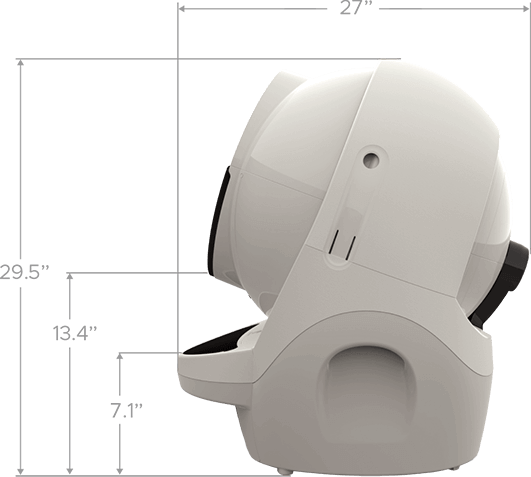
The Litter-Robot 3 is absolutely huge in comparison to a regular litter box which are generally quite small and compact. This may be negative point if you live in a relatively small home and do not have much space.
- Overall Height: 29.5 inch
- Width: 24.25 inch
- Opening: 10.25 inch
- Weight (Empty): 24lbs.
The unit also has a handy little step to help your cat get into the opening. You can view all of the dimensions more clearly in the images below.

Design And Color
If your into futuristic design and cool looking gadgets, then you will love the Litter-Robot 3 Connect. It's constructed of two main pieces which are both made of heavy-duty plastic:
- The Globe: Has sensors triggered by your cat and is lined with rubber.
- The Base: Features a waste drawer that can be lined with plastic bags and can easily be pulled out. Three bags are included when you purchase.
The unit also comes in a choice of two colors which are grey and beige as you can see in the images below.


Litter Options
What litter works best with litter robot?
It's important to use clumping litter with the Litter Robot. If you don't then liquid waste will not deposit into the base. Here are a few examples of some good clumping cat litter available on the market.
Care and maintenance
In this section of the Litter-Robot 3 Connect Review, we are going to look at the care and maintenance of the unit to help keep it clean, smelling fresh, and prolong the life of the machine.
How often do you empty a litter robot?
As a general rule, you should empty the litter robot once per week, per cat. This means if you have two cats, then you should empty it twice per week, three cats, three times per week etc.
Why does my litter robot smell?
If your litter robot smells then there is something in the maintenance process that you are either doing wrong or missing out completely. It's important to remember that it is never going to be odor free, but it will reduce the smell significantly.
Here are some guidelines to follow:
- Empty the waste drawer: Make sure to empty the drawer when indicated, and change the liner to a clean fresh one.
- Add litter: Each time you empty, make sure to top up on litter if required. Just make sure to not overfill by going above the marker.
- Carbon filer and seal strips: It's important to replace the Carbon Filters and Seal Strips which help to trap unpleasant odors. Carbon filters should be replaced every few months. Seal strips should only be replaced if you notice the current ones are starting to wear away.
- Cleaning: Depending upon how often the unit is used, have a cleaning process about once a month or so where you wipe the litter-robot down. Give it a more thorough and deep clean at least a couple of times per year. For this, the unit breaks down into several parts to allow easy cleaning.
Do Cats Like The Litter Robot?
All cats are unique with their own individual personality. Some cats will take to the Litter Robot straight away, others will be absolutely terrified of it. If your cat is not using the Litter Robot, just follow the steps in the video below.
We also have a guide which will show you how to train a cat to use a litter box.
Price
The Litter-Robot 3 is a little on the expensive side, but if you have the budget then it's worth it, and they even have a pay-monthly option. Let's take a look at the details.
Price: $499.00 | Standard with an 18-month warranty
Pay Monthly: Over 3 months - $170.41 pm | 6 months - $86.82 pm | 12 months - $45.06 pm
Add-Ons:
- Extended warranty: $49.99 | An additional 18 months of coverage
- Litter trap mat: $30.00
- Waste drawer liners (50): $32.99
VERDICT
To conclude this Litter-Robot 3 Connect Review, let's summarize and see if it is worth the money.
Does litter robot really work?
When it comes to odors, there are complaints that the litter robot still smells. First of all, the company states that it doesn't completely eliminate odors, but reduces it. Second, nothing is really going to 100% eliminate all odors.
In our opinion it does an excellent job, and a much better job than any standard litter box. It also does an excellent job of reducing litter which means you will not have to top up as much as usual. This will also save you money on litter.
Is the Litter Robot 3 worth the money?
The Litter Robot is very expensive, and may be a little over-priced, but you get what you pay for. $499 is a lot of money in one go, but they do have the pay-monthly option where you can pay as little as $45.06 per month.
When it comes to litter boxes, there are cheaper options available on the market. Just do a little research and see what is best for yourself. It will all depend on your budget, how many cats you have, and how much space you have in your home.
Before you order
Here's just a couple of things to keep in mind before ordering the Litter Robot.
- The company recommends 1 robot for every 3-4 cats.
- They have a 90-day full refund return policy.
- It comes with an 18-month warranty with the option to extend this to an additional 18 months.
Conclusion
If you have a Litter-Robot 3 Connect, it would be great to hear your opinions. let us know your experience in the comments section below.

